
Learna: Speak & Learn English
DEEP FLOW SOFTWARE SERVICES · Education · $6.3M/mo · 2.1M downloads · ★ 4.6
Screens5
3Feature intro
Colors
- #E3F0FCSky Blue Ambient · screen background fill
- #FFFFFFPure White · card backgrounds · bottom sheet fill
- #308CF6Primary Action Blue · cta button fill
- #10416EHeader Navy · sheet title · body text
- #27C378Correction Green · correct sentence pill background
- #FFCDD2Error Light Pink · error highlight pill background
- #E55353Warning Red · accuracy badge border/text · error callout text
- #E58E26Accent Orange · pronunciation category header
Type
- Sheet TitleSF Pro Rounded · 68px · 800 · #10416E
- Sheet DescriptionSF Pro Text · 36px · 400 · #10416E
- Category TagSF Pro Text · 32px · 700 · #3B82F6
- Feedback ExplanationSF Pro Text · 32px · 500 · #1E293B
- Phonetic GuideSF Pro Text · 28px · 400 · #64748B
Elements
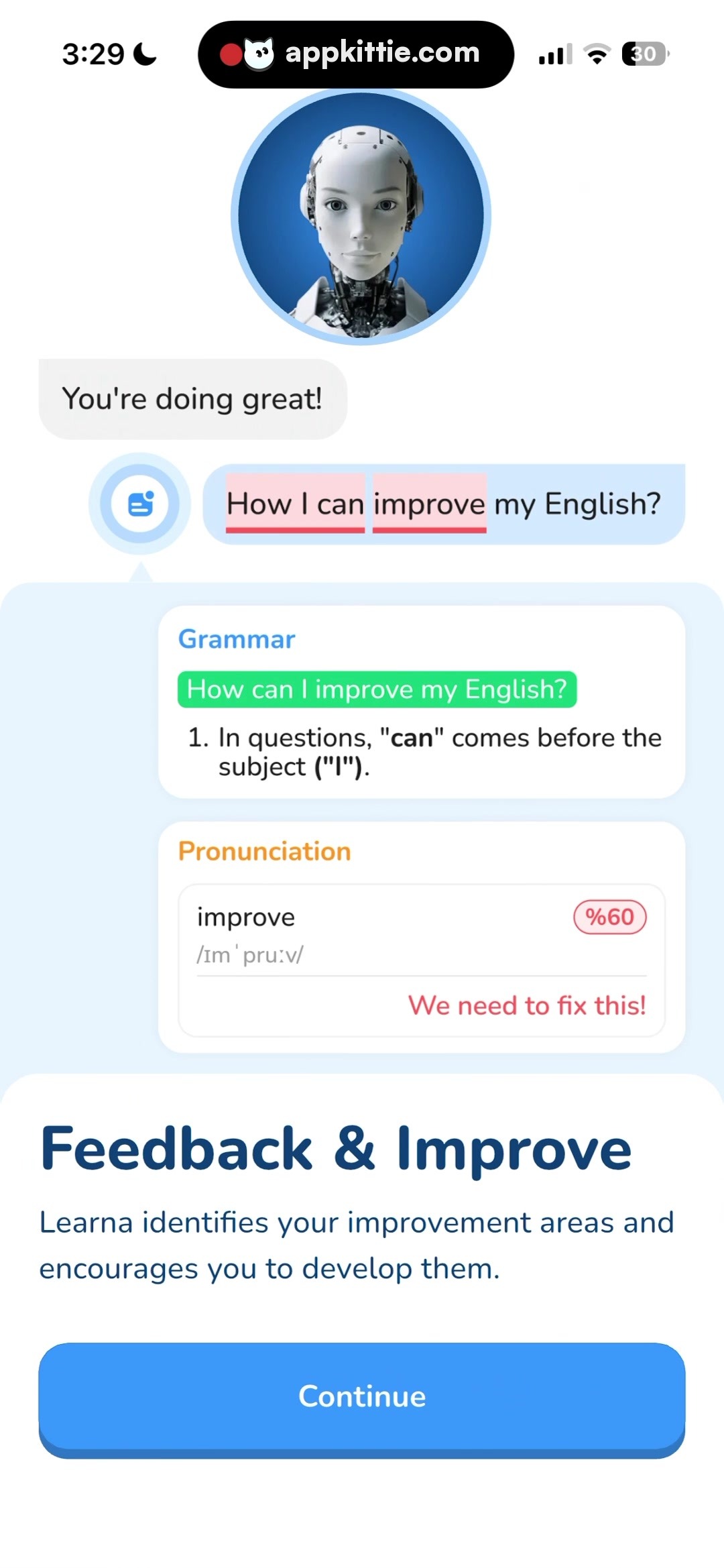
Avatar Header Circle · avatar
Top center of screen, circular framed robot portrait with blue circular aura, diameter ~350px · Round image with layered radial cyan-blue border shadow
Tutor Chat Bubble · chat_bubble
Left-aligned chat message above user input · Off-white rounded pill bubble with subtle border
User Input with Errors · chat_bubble
Right-aligned message bubble with leading blue action icon · Light pastel blue bubble background with highlighted words inside soft pink/red rectangles and underlines
Grammar Feedback Card · card
Stacked above pronunciation card, full horizontal width with side margins · White rounded rectangle with green correction pill header and bulleted grammatical tip
Pronunciation Feedback Card · card
Stacked below grammar card within review container · White rounded card with orange category title, word transcription, percentage pill (%60), and red action notice
Bottom Sheet Container · sheet
Anchored to bottom edge of screen, containing feature summary and action button · Solid white fill with smooth top corner rounding
Layout
Feedback breakdown interface structured vertically. Top region displays tutor persona avatar and conversational exchange. Middle area presents educational diagnostic feedback cards (Grammar & Pronunciation). Bottom region holds persistent onboarding sheet with CTA.
Notes
The pink highlighted spans represent detected mistakes; the percentage notation shows '%60' which is typical of certain locale conventions.
Store


