
Heyyyy: Stories that text back
heyyyyAI Inc. · Entertainment · $1.1M/mo · 184K downloads · ★ 4.7
Screens48
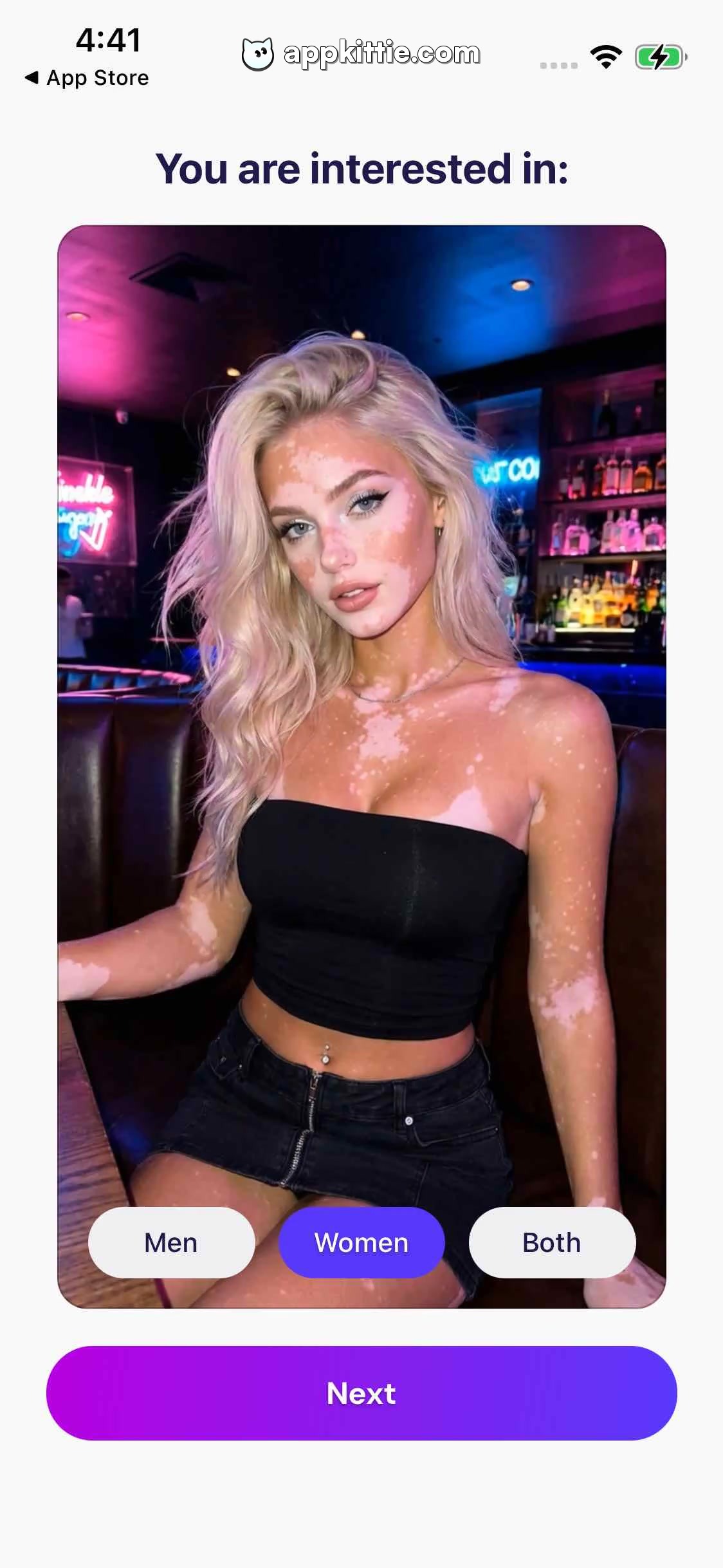
4Preferences
Colors
- #FAF9FCBackground · Screen background fill
- #25215AHeadline Dark · Header text
- #4D46E8Active Pill Purple · Active selection pill background
- #FFFFFFInactive Pill Background · Inactive options background
- #1E1B3EInactive Pill Text · Inactive options text label
- #A20CE5CTA Gradient Start · Primary Next CTA gradient start
- #4A45E7CTA Gradient End · Primary Next CTA gradient end
Type
- Screen Header-apple-system · 34px · 800 · #25215A
- Segment Label Active-apple-system · 24px · 600 · #FFFFFF
- Segment Label Inactive-apple-system · 24px · 600 · #1E1B3E
- Primary Action CTA-apple-system · 26px · 700 · #FFFFFF
Elements
Header Prompt · heading
Top centered title ~50px below status bar. · 'You are interested in:' in bold deep purple font.
Female Portrait Card · card
Large rounded photo card taking up majority of center viewport with ~28px margin. · Portrait photo of a blonde female subject with vitiligo in bar setting, clipped to rounded rectangle.
Selection Segment Pills · segmented_control
Horizontal row positioned over bottom portion of photo card; options 'Men', 'Women', 'Both'. · 'Women' selected with purple pill fill and white text; 'Men' and 'Both' unselected white pills with dark text.
Next CTA Button · button
Bottom full-width pill button, height ~86px, margin matching card. · Purple-to-blue linear gradient fill with white bold text 'Next'.
Layout
Identical layout to Screen 2 displaying alternate gender preference state ('Women' selected) and corresponding portrait image.
Notes
Seamless transition from Screen 2 updating preview card according to gender choice.
Store


